

An Easy-to-Understand Guide to How Thermal Management Keeps the Digital World Running
1. Introduction – Why Cooling Matters in Data Centers
Data centers operate 24 hours a day, 365 days a year. Inside these massive facilities, thousands of servers, GPUs, storage arrays, and networking devices process endless streams of data for everything from streaming video to cloud computing and artificial intelligence.
While operating, these electronic devices consume enormous amounts of electricity, almost all of which is converted directly into heat. If this heat is not continuously removed, internal equipment temperatures rise rapidly. Excessive heat damages electronic components, degrades performance, and leads to system failure. Consequently, a robust cooling system is a vital, mission-critical component of data center infrastructure.
2. Where Does the Heat Come From?
Every active electronic component inside a data center generates heat. Understanding the heat source helps engineers design targeted thermal management solutions.
- CPUs & GPUs: Central Processing Units and Graphics Processing Units are high-density compute chips that generate extreme localized heat during processing.
- Servers & Storage Systems: Hundreds of individual server blades and solid-state/hard disk arrays produce steady thermal output continuously.
- Networking Equipment: High-speed switches and routers handle massive data throughput, generating substantial warmth.
- Power Conversion Equipment: Uninterruptible Power Supplies (UPS) and transformers lose energy as heat during power distribution.
Electrical Power Input ➔ IT Equipment Processing ➔ Thermal Heat Generation
3. How Does a Data Center Cooling System Work?
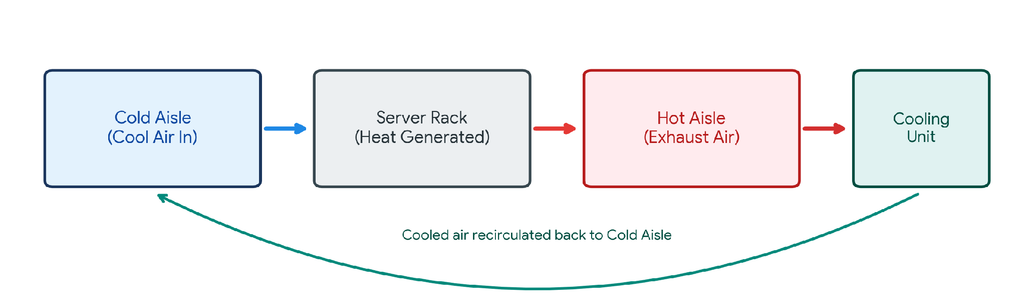
At its core, a data center cooling system operates like a continuous heat exchange loop. Rather than simply ‘creating coldness,’ its job is to collect heat from IT equipment and transport it safely outside.
- 1. Air Intake: The server pulls in cool air from its environment into the chassis.
- 2. Heat Absorption: As cool air passes over hot internal chips and circuit boards, it absorbs thermal energy.
- 3. Hot Air Exhaust: The warmed air is pushed out through the rear of the server cabinet.
- 4. Capture & Transport: A dedicated cooling unit collects the hot exhaust air and transfers the heat into a liquid medium (refrigerant or chilled water).
- 5. Outdoor Heat Rejection: The heat is carried away from the server room and discharged into the outside environment.
4. Airflow Management: Cold Aisle & Hot Aisle Containment
To maximize energy efficiency, data centers arrange server racks in alternating rows called Cold Aisles and Hot Aisles. Fronts of servers face Cold Aisles (intake), while rears face Hot Aisles (exhaust). Physical containment barriers prevent cold supply air from mixing with hot exhaust air.
5. Common Data Center Cooling Technologies
Cooling architectures fall into two primary categories based on the medium used to transfer heat:
- Air Cooling Systems: The traditional standard. Uses Computer Room Air Conditioners (CRAC) or Computer Room Air Handlers (CRAH) to circulate cold air through raised floors or overhead ducts.
- Liquid Cooling Systems: Designed for modern high-density hardware (like AI GPU clusters). Liquid conducts heat up to 25 times more efficiently than air. Common methods include Direct-to-Chip cooling (cold plates attached directly to processors), Rear-Door Heat Exchangers, and Immersion Cooling (submerging servers in non-conductive dielectric fluid).
6. From Cooling to Heat Rejection: The Heat Transfer Chain
It is crucial to realize that cooling units do not eliminate heat—they transfer it. Heat travels through a multi-stage rejection chain until it reaches the outdoor air:

7. Why Cooling Reliability Matters
Because servers generate heat continuously, even a brief interruption in cooling can cause ambient temperatures to spike within minutes. A cooling failure triggers a cascading operational disruption:

To protect hardware, servers automatically enter ‘thermal throttling’ (reducing processing speed to cool down) or perform emergency safety shutdowns, which directly causes costly service outages and downtime.
8. Conclusion
A data center cooling system is far more than just a large air conditioner. It is a highly engineered, integrated thermal management system designed to continuously extract heat from sensitive electronics and reject it into the outside environment. As digital infrastructure and artificial intelligence continue to grow, efficient and reliable cooling remains the unsung hero keeping the global internet running seamlessly 24/7.